


FastVid AI: Photo to Video
3.411.00 Reviews
App Specs
- Version
- 1.0.2
- Updated On
- License
- Free
- Downloads
- 100,000+
- Developer
- Ankit20
- Categories
- Lifestyle
- Platform
- Android
Screenshots
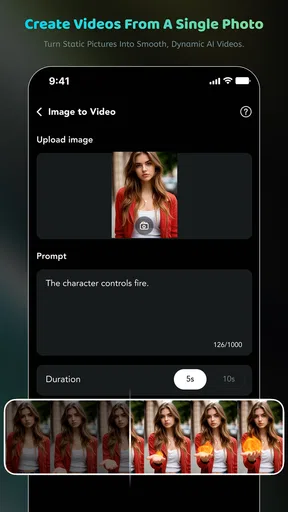
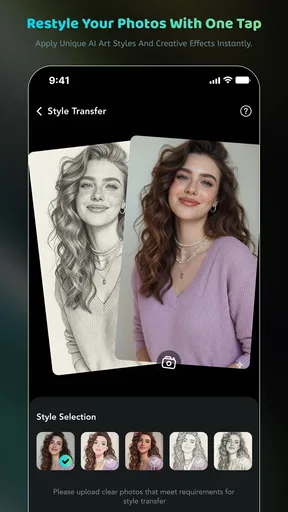
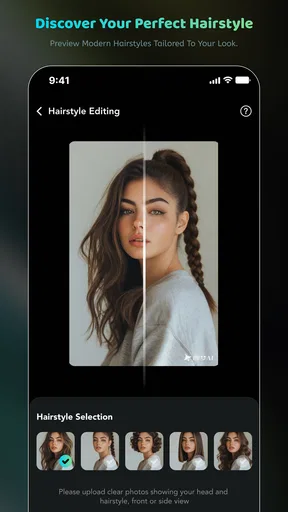
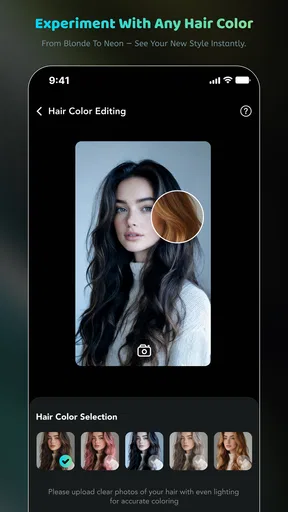
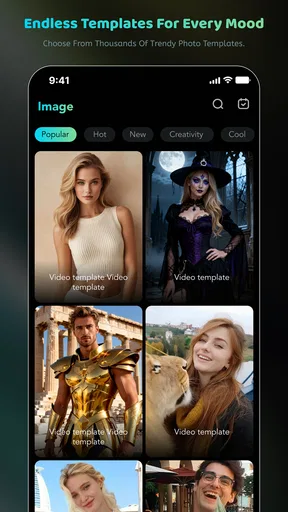
 Analysis by AppCompare
I spent time with FastVid AI: Photo to Video as a lifestyle app for turning still images into short, more expressive visual creations. Its appeal is easy to understand: instead of leaving a favorite photo in the camera roll, I can give it movement, a stronger mood, or a more polished presentation through AI effects and ready-made templates. It is aimed at people who want quick results on a phone rather than a full editing workstation.
My overall impression is mixed but useful. The app is approachable, and its combination of AI video generation, photo editing, magic effects, and templates gives casual creators several ways to start. At the same time, the experience depends heavily on how smoothly the app can process a request, how patient I am when a result needs another try, and whether I am comfortable with the limits of a compact mobile editor. It works best as a fast experimentation tool, not as a replacement for a complete video-production suite.
How FastVid AI feels when a connection matters
FastVid AI is developed by Ankit20 and sits in the lifestyle section rather than presenting itself as a professional editing platform. That distinction matters. I approached it as something to open when I had a photo and an idea, not as the place to manage a long project with carefully arranged clips, detailed audio mixing, and frame-by-frame control.
The most important practical point is that the app’s AI-oriented workflow is closely tied to network conditions. When I am connected reliably, the process feels suited to quick creative decisions: choose an image, try an effect or template, review the result, and decide whether it is worth keeping. When the connection is weak, the same simple idea becomes less predictable because generation and processing can take longer or require another attempt.
This changes how I use it. I would not open it while rushing through a train station, standing in a crowded venue, or relying on an unstable public hotspot for an important post. Those are situations where a conventional editor with already available local tools is usually less stressful. FastVid AI is more comfortable when I have a stable connection and a few uninterrupted minutes.
The network issue is not just about speed. A creative app encourages trial and error, and every interruption makes experimentation feel expensive in time and attention. If I am testing several visual styles on the same portrait, a delayed response can make me forget which prompt or setting produced the best result. My practical tip is to decide on the source image and the intended mood before starting. That reduces unnecessary retries and makes a poor connection less frustrating.
I also found that templates can be useful in this situation because they give the session a clear direction. Rather than asking the app to transform a photo without a plan, I can begin with a visual format that matches the occasion. A birthday image, a travel memory, or a simple social post each benefits from a different level of movement. The template approach is faster than building everything from an empty timeline, although it naturally gives me less control over the exact outcome.
Worth Reading Before You Choose

EA SPORTS FC Mobile 26 Is a Bigger Football Game, but It Takes Time

Flipboard Shows What News Apps Must Do Beyond the Feed

Switching to Android Auto Means Rethinking Your Driving Routine

Google Calendar Makes a Crowded Week Easier to Manage

Ludo King Makes the Most of the Minutes Between Plans

Baby Panda World Brings Quick Play to Modern Phones, but Its Game Library Feels Busy
What the app is suited to on a phone
FastVid AI makes the most sense for mobile-first tasks. I can imagine using it after taking a family photo, preparing a casual greeting, or turning a group of personal images into something more lively for sharing. It is also a reasonable option for someone who finds traditional video editors intimidating. The combination of templates and effects lowers the number of decisions required at the beginning.
A realistic everyday scenario would be preparing a short visual message for a friend’s birthday. I would select a clear portrait or a small set of meaningful images, choose a style that does not overpower the subject, and review the animation before sharing it. The advantage is not that the result becomes a polished film; the advantage is that I can create something more personal than a static image without learning a complicated editing interface.
That convenience has a trade-off. AI styling can make an image feel more dramatic, but it may also move attention away from the person or place that made the photo meaningful. I prefer subtle effects for personal memories and reserve stronger magic effects for playful posts where an artificial look is part of the point. If authenticity matters, I would compare the original and generated versions before deciding which one to use.
The app is also better for individual moments than for demanding multi-part projects. If I need exact timing between several scenes, precise text placement, detailed sound editing, or consistent branding across many videos, I would choose a more established editor with a deeper timeline. FastVid AI’s strength is the jump from image to idea, not exhaustive manual control.
Its minimum operating requirement is Android 7.0, which makes it accessible to people using older Android devices. Even so, compatibility is not the same as comfort. AI creation can be more pleasant on a newer phone with enough free storage and a strong connection, especially when I am reviewing several variations. On an older device, I would keep the source images organized and close other demanding apps before beginning a session.
Using it away from home
Mobile convenience is valuable, but it should not be confused with guaranteed availability everywhere. I would treat FastVid AI as an app for connected moments. At home, on a dependable office network, or with a strong mobile signal, it fits naturally into a short creative break. In a basement, on an airplane, or in a location with unreliable reception, I would plan to do the creative work later instead of depending on immediate generation.
This is especially relevant for travel. I might want to turn a landmark photo into a moving postcard while still at the destination, but a weak signal could make the process awkward. My preferred workflow would be to capture and sort the images first, then create the final versions when I have a reliable connection. That separates the enjoyable part of taking photos from the less predictable part of processing them.
For parents or anyone sharing a device with others, the mature age classification also deserves attention. FastVid AI is marked Mature 17+, so I would not treat it as an automatically suitable creative app for children simply because the interface may look casual. Adults should make the decision about whether it fits the intended user and the kind of images being edited.
The app is free to install, which makes trying the basic experience less of a commitment. However, in-app purchases range from $1.99 to $99.99 per item. That is a wide span, so I would be careful before approving any purchase during an enthusiastic editing session. I would first learn what can be achieved without paying, then decide whether a paid option genuinely improves a recurring workflow rather than merely satisfying curiosity.
When a generation does not go as planned
The natural weakness of AI editing is that the first result may not match the idea in my head. A face can look too stylized, movement can feel excessive, or a template can impose a mood that does not suit the image. I would not judge the app from one unsuccessful attempt. Instead, I would change one element at a time: use a clearer source photo, select a simpler effect, or switch to a template with less visual activity.
Source quality makes a noticeable difference to any photo-to-video workflow. I would choose an image with a clear subject, reasonable lighting, and enough space around the important details. A tightly cropped face or a busy background gives an automated effect less room to create a convincing result. This is a useful habit because it improves the odds of a good outcome without requiring extra editing knowledge.
Another practical tip is to keep the original photo untouched. I would duplicate or separately preserve the source before applying a dramatic transformation. That gives me an easy recovery path if the generated version feels unnatural, and it lets me compare the effect rather than judging it from memory. For sentimental pictures, this is more important than any individual filter.
If processing stalls, I would avoid repeatedly tapping the same action. I would first check whether the connection is stable, wait for the current attempt to finish, and then reopen the workflow only if necessary. Repeated submissions can create confusion about which result belongs to which attempt and may also increase the chance of accidentally triggering a paid option. A calm, single-change approach is safer and easier to evaluate.
Recovery also means accepting that some images are better left as photos. The fact that an app can animate a picture does not mean every picture benefits from animation. A quiet landscape, a carefully composed portrait, or a document-like image may lose its character when covered with movement and effects. I use the app more successfully when I ask whether motion adds meaning, rather than assuming it is automatically an improvement.
Keeping a sensible data and spending routine
Because the app is designed around visual creation, I would be selective about the images I upload or process. Personal photos can contain faces, locations, children, documents, or other details I would not casually share. I would avoid using sensitive images merely to test an effect, and I would choose a less personal sample when exploring the interface for the first time.
A data-conscious workflow also helps with mobile costs. AI processing and repeated previews can consume more connectivity than simply browsing a gallery, so I would save creative experiments for Wi-Fi when my mobile allowance is limited. I would also prepare a small selection of images instead of sending every version from a camera burst. Fewer, better-chosen inputs make the session more focused and reduce unnecessary transfers.
There is a creative benefit to this restraint. When I limit myself to two or three carefully selected photos, I spend more time deciding what I want the final piece to communicate. That usually produces a better result than generating many variations without a clear purpose. The app encourages quick experimentation, but a little planning prevents the process from becoming wasteful.
Spending deserves the same attention. Since the app is free but includes paid items, I would treat purchases as optional enhancements rather than part of the basic promise. I would check the price shown at the moment of purchase and consider whether I will use the effect more than once. A one-off novelty may be fun, but it is not good value if I only open the app for occasional greetings.
For frequent creators, the decision is different. Someone who regularly makes short social visuals may find that a paid item saves enough time to justify itself. Even then, I would compare the result with a conventional editor before spending heavily. A manual app may take longer but offer more predictable control, while an AI tool may be faster but less consistent from one image to the next.
Who should choose it, and who should look elsewhere
I would recommend FastVid AI to casual creators who want to make a still image feel more alive without studying a complex editing program. It is particularly appealing if templates help you get started and if you enjoy comparing several visual interpretations of the same photo. It can also suit someone preparing quick personal messages, lightweight social content, or playful transformations on a phone.
I would be more cautious recommending it to professional editors, businesses that need strict visual consistency, or anyone working under a deadline where a failed generation is costly. Those users may prefer a traditional editor with a dependable timeline, precise adjustments, and a clearer repeatable process. I would also suggest skipping it if your main need is simple cropping, color correction, or trimming; a standard photo editor can handle those jobs with less distraction.
The current release is version 1.0.2, and the app has an average rating of 3.5 from roughly a hundred ratings, with a smaller group of written reviews. I read that as a sign to keep expectations measured rather than assuming the experience will be perfect for every phone and every image. Its install base is above a hundred thousand, so it has attracted meaningful curiosity, but popularity alone does not remove the need to test the workflow personally.
What I like most is the low barrier between having an image and trying a visual idea. What holds it back is the uncertainty that comes with automated results, the importance of a stable connection, and the possibility that paid options may become tempting before I know whether I will use them. Those are manageable issues when I approach the app as a creative sketchbook rather than a complete production environment.
My connectivity verdict
FastVid AI: Photo to Video is worth trying if your goal is quick, mobile-friendly experimentation with photos, effects, and templates. I would open it when I have a reliable connection, a clear idea, and a source image that can handle visual movement. I would keep the original, avoid unnecessary retries, and review every result before sharing it.
The app is less convincing as an all-purpose editor or as a tool for urgent work in places with poor reception. In those cases, a conventional editor is the safer choice because it gives me more immediate control and fewer processing uncertainties. For relaxed personal projects, though, FastVid AI offers an enjoyable shortcut from static image to animated concept.
My final recommendation is therefore conditional but positive: try the free experience, judge it with several different photos, and pay attention to how it behaves on your usual connection and phone. If the generated style matches the kind of visual messages you actually make, it can earn a place in your mobile toolkit. If you need precision, consistency, or dependable work away from a network, I would keep it as an occasional experiment rather than making it your main editor.
Pros
- Turns still photos into engaging videos with minimal editing effort.
- AI effects and motion presets make creative results accessible to beginners.
- Useful for social media posts
- stories
- reels
- and short promotional clips.
- Simple interface helps users create videos quickly on a mobile device.
- Supports adding music and visual elements for more personalized projects.
Cons
- AI-generated motion can look unnatural on some photos.
- Advanced customization may be limited compared with full video editors.
- Export quality and available formats may depend on the selected plan.
- Some templates and effects may require in-app purchases.
- Processing can take longer when creating complex videos or using many images.
FAQs for FastVid AI: Photo to Video
What is FastVid AI: Photo to Video, and what can it do?
FastVid AI: Photo to Video is a mobile application designed to transform still images into short animated videos using artificial intelligence. After selecting a photo, users can typically apply motion effects, transitions, templates, music, and other creative adjustments. It is aimed at creating social-media content, slideshows, greeting clips, and visual stories without requiring advanced video-editing experience.
How do I create a video with FastVid AI: Photo to Video?
To create a video, you generally begin by importing one or more photos from your device or selecting images through the app’s media picker. You can then choose an animation style or template, adjust the duration and presentation, add music or text, and preview the result before exporting it. The exact tools and available effects may vary depending on the app version, device, and subscription plan.
Is FastVid AI: Photo to Video free to download and use?
The application may be available to download at no initial cost, but some features can be restricted by in-app purchases, subscriptions, credits, or premium plans. Advanced AI effects, exclusive templates, higher-quality exports, and removal of branding may not be included in the free experience. Before confirming a purchase, check the current store listing and subscription terms carefully, including renewal and cancellation conditions.
Does FastVid AI: Photo to Video add a watermark to exported videos?
Watermark behavior can depend on the selected template, export settings, and whether you are using a free or premium account. Some free versions of creative video apps include branding on exported clips, while paid plans may offer watermark-free saving. It is best to preview the final result and review the export screen before sharing, especially if you need a professional-looking video for business or social media.
Are my photos safe when I use FastVid AI: Photo to Video?
Because FastVid AI features may process images with cloud-based artificial intelligence, users should review the app’s privacy policy and permissions before uploading personal photos. Avoid submitting sensitive documents, private images, or pictures of other people without permission. Check what information is collected, how long uploaded content is retained, whether it is used to improve services, and how account data can be deleted.


